


The SDMX Lab

#industry #finance #lifesciences #other

A Browser-Based Environment for Learning and Teaching SDMX

HMS supports organizations in learning, testing, and applying SDMX with the SDMX Lab.

Request access now

HMS developed the SDMX Lab as a browser-based environment for learning, training, and testing SDMX tools. It provides a preconfigured workspace for users who are new to SDMX, training teams, or evaluating tools and workflows.

The SDMX Lab runs entirely in the browser and requires no local installation or configuration. Users can work directly with SDMX tools, structures, and workflows in an isolated environment.
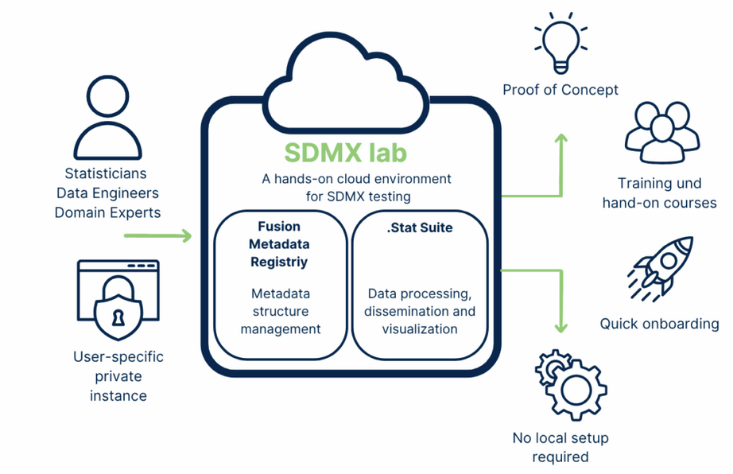
On this page, you'll learn what the lab has to offer, who it's intended for, and how you can get started right away.

Key Features

What is the SDMX Lab?

The SDMX Lab is a cloud-based work environment that gives you access to a preconfigured set of SDMX tools. It is preconfigured and ready to use.

The Lab includes:

Cockpit

Your central hub with quick access to all SDMX tools. It is continuously updated with new tools and features.

Excel Integration (FusionXL & .Stat DLM Add-in)

Work directly with SDMX structures and data in Excel. Validate and export immediately to standard formats.

Fusion Metadata Registry (FMR)

Create and Validate SDMX Metadata Structures

.Stat Suite

Manage the entire SDMX data lifecycle—from transformation to distribution—through a simple browser interface.

Jupyter Notebook Integration

Use Jupyter Notebooks with preconfigured SDMX Python packages to automate, extend, and reproduce workflows.

Access to the Public Registry

Import live metadata for testing and exploration.

Environment Reset

Restart at any time with just one click.

Everything runs directly in your browser. No installation, setup, or local configuration is required. Each lab instance is private, resettable, and tailored to your needs. After a quick email request, you’ll receive your personal lab environment and can get started in just a few minutes.

How to Get Access to the SDMX Lab

Contact us now
 

Simply send us a brief email (sdmx@analytical-software.de).

Please include your name, your institution (if applicable), and the intended use (e.g., training, evaluation, learning).

During business hours, we usually provide access within a short period of time.

Who is the SDMX Lab intended for?

Beginners and New SDMX Users

Learn about SDMX workflows without any technical complexity. Ideal for those new to the standard.

Trainers and Course Organizers

Assign individual lab instances to participants and teach SDMX in a practical way—without the need for any local installation or infrastructure.

Technical Users and Evaluators

Test and compare SDMX tools safely—completely separate from your production systems.

A Quick Start Guide for Participants

We've created a concise handout so that course participants can get started with SDMX Lab right away.

It contains clear, step-by-step instructions for registering, logging in, and accessing support.

What you’ll get:

  • How to register for the SDMX Lab and receive your login credentials
  • How to log in and access your personal Labspace
  • How to use the support chat and FAQs if you have questions or problems
  • Which tools (FMR, .Stat Suite) are available in the Lab

Download now (EN only)

A Practical Guide for Course Organizers

Events

We have created a practical resource specifically for SDMX trainers, instructors, and course organizers.

This guide will help you plan and conduct hands-on training sessions using the Lab, step by step.

What you’ll learn:

  • How to prepare and assign SDMX Lab instances to course participants
  • How to manage browser compatibility and avoid multi-user conflicts
  • What to do in the event of crashes or data loss, and how to distribute fallback files
  • Best practices for conducting interactive, hands-on SDMX sessions with minimal technical effort

Download now (EN only)

Technical Setup and System Requirements

Access and Technical Requirements

Supported browsers: Chrome, Firefox, Chromium (latest versions)

Individual access available upon request: sdmx@analytical-software.de

No installation or local configuration required

Licensing and Scope of Application

License: Apache 2.0

Usage: For training, testing, and prototyping purposes only (not for production use)

Trial period: Two weeks (extendable upon request)

Current Restrictions

Dataflow indexing in the .Stat Suite is currently undergoing maintenance

Programmatic access to FMR is not yet fully supported

Each user receives a separate lab instance. Sharing an instance between multiple users may lead to data conflicts.

Deepen Your SDMX Expertise

Roadmap, Support, and Opportunities for Collaboration

What’s Next:

  • VTL Support: Define and apply validation and transformation rules in the Lab.
  • Simplified Registration: Streamline access to individual lab environments.
  • AI-Assisted SDMX: Support the creation and refinement of SDMX structures with AI.
  • Self-Paced Courses: Learn SDMX directly in the Lab through guided learning modules.
  • Collaboration Features: Enable multiple users to work on SDMX structures within shared environments.

We are continuously developing the SDMX Lab. 

Please feel free to contact us if you:

  • Would like to provide feedback or request new features
  • Want to access the roadmap or technical documentation
  • Would like to participate in SDMX workshops, training sessions, or research projects

FAQ

Questions About the SDMX Lab

Answers regarding access, features, and use of the SDMX Lab.

You can work with the SDMX-ML (XML), SDMX-JSON, and SDMX-EDI formats—depending on the specific capabilities of the integrated tools.

Yes. Data, data structure definitions, data flows, and other SDMX structures can be downloaded manually using the respective tool interfaces.
Automatic synchronization or export to the cloud is not currently supported.

The Lab is continuously being developed.

Major updates are communicated via the SDMX.io website or upon request.

A roadmap is available upon request. Visit sdmx.io

Can't find your question here?

We’d be happy to answer your questions about our services and work with you to determine which option best suits your situation.

Contact Us Now

Are you interested in the SDMX lab or do you have any questions?

Benjamin Keller
Benjamin Keller
Head of SDMX Solutions

During a free, no-obligation initial consultation, we’ll assess your situation and work with you to determine the best next step.

By submitting this form, I accept the Privacy Policy.

Are you interested in SDMX and how we can help you with it?

Read more

SDMX Consulting & Implementation

Learn more about our approach to SDMX and how we support organizations with implementation and training.

Visit our SDMX page now